PRACTICAL GUIDE
How to Manage Construction Site Inventory
How to manage construction site inventory by separating reusable tools and equipment from consumable materials, stock, and purchasing workflows.
Start freeHow do you manage construction site inventory?
To manage construction site inventory, separate reusable tools from consumable stock, establish a reliable starting count, assign a responsible person to each handoff, and reconcile physical counts against the register. Investigate differences before changing records.
WORKFLOW
A six-step construction site inventory process
- 01
Separate reusable items from materials: a drill needs its own identity and custody history; screws and sealant need quantities and replenishment rules.
- 02
Choose one distinct asset code per physical tool. Record a clear name and category, and brand, model or serial number when available.
- 03
Count by shop, truck and active job site. Confirm items held away from the count location with the recorded worker and retain an exception list.
- 04
Agree who records each issue, transfer and return. At the handoff, confirm the physical item, receiving worker and destination.
- 05
Choose a repeatable count schedule and recount at site close-out or crew changes. Review unresolved differences before the next dispatch.
- 06
Reconcile exceptions with the latest history and responsible people. Preserve earlier events, record confirmed corrections through authorized actions, and keep materials reorders in a separate stock process.
| Count result | Follow-up | Record to keep |
|---|---|---|
| Tool is present with a different worker | Confirm the handoff with both workers | An authorized MOVE, preserving earlier history |
| Tool is absent from its recorded truck | Check the latest event and contact the holder | The discrepancy and any authorized missing report |
| A new tool has no record | Check for an existing code or serial number first | One new tool record with a distinct asset code |
| Consumable quantity is below the site's target | Use the materials replenishment process | A stock adjustment or reorder outside tool custody |
Separate Tools, Equipment and Consumable Materials
Start with two lists. List reusable tools individually, with their asset code and recorded holder or location. List consumables by material, unit and quantity. Do not turn a box of fasteners into hundreds of tool records or treat an absent drill as a routine stock adjustment.
When Construction Inventory Software Makes Sense
Use construction inventory software when the job requires quantity counts, material receipts, replenishment or warehouse stock controls. Assign someone to review units, delivery discrepancies and reorder decisions. TakeMoveReturn does not provide those materials workflows.
Construction Inventory Management Software vs Tool Tracking
Construction inventory management software and tool tracking answer different questions. A materials register asks how many units remain; a tool record asks which physical item is with which worker and when it moved. Keep a common reference for the project while preserving those different processes.
Track Reusable Tools Across Workers, Trucks and Job Sites
At each tool handoff, compare the asset code with the physical item and confirm the next holder and location. Record TAKE, MOVE or RETURN in the authorized workflow. At a site count, a tool found with a different worker needs a confirmed handoff update, not a second row for the same item.
Why Spreadsheets Break Down on Active Job Sites
A spreadsheet is a useful starting point when one person owns the list. It becomes unreliable when several crews edit separate copies or leave transfers unrecorded. Import a reviewed starting list, keep an exception log during counts, and use one ongoing process for tool movements.
Run a site count without mixing tools and consumables
Start with reusable tools that move between crews. Count materials separately, then reconcile each tool against its asset code, holder and recorded location. A tool physically present but checked out to another worker needs a handoff correction, not a second inventory row.
Put it into practice
- Group the count by warehouse, truck and job site.
- Record discrepancies for follow-up rather than silently overwriting the list.
- Use a reviewed CSV import for new tools and QR events for subsequent movement.
Download an illustrative tool register (CSV). This is a planning example, not a prevalidated import or a customer dataset. Review and map columns in the import workflow.
For product corrections, contact support@takemovereturn.com. About the service and operator.
PRODUCT PREVIEW
See the record before you search for the tool.
Keep the details field teams need together, from the tool list to the next handoff.
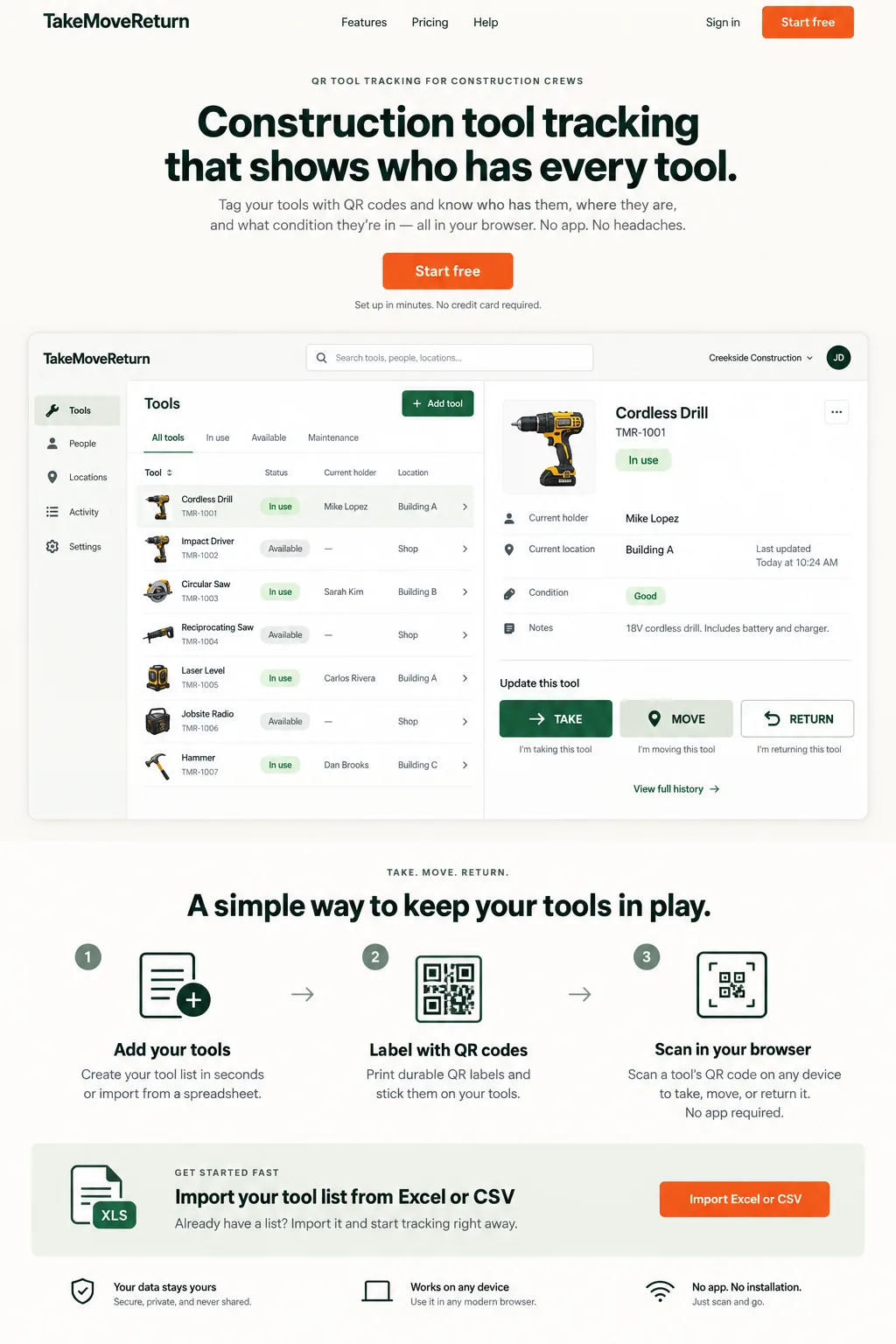
Illustrative design preview with fictional records. The current workspace interface may differ.
FAQ
Questions crews ask before they switch.
Is TakeMoveReturn construction inventory management software?
It is focused on reusable tools and equipment rather than consumable materials or warehouse stock. Use inventory software for materials and TakeMoveReturn for tool custody and movement.
What should I look for in the best construction inventory management software?
For materials, look for stock, purchasing, quantity, and warehouse workflows. For reusable tools, prioritize holder, location, checkout, return, condition, and movement history instead.
Should materials and tools use the same inventory process?
Not necessarily. Reusable tools need item-level custody; consumables normally need quantity and replenishment controls that TakeMoveReturn does not provide.
Give every tool a clearer next move.
Start with your existing spreadsheet, print QR labels, and give your crew a clear field workflow.